Wagons: getting deliveries started
How do the two wagons differ?
Cargo capacity counts items; the speed factor is the vehicle’s base parameter. Fixed-route passenger mode doubles movement speed and disables cargo handling.
| Vehicle | Horses | Cargo | Speed factor |
|---|---|---|---|
| Two-Wheeled Cart | 1 | 2,000 | ×2 |
| Four-Wheeled Cart | 2 | 5,000 | ×1.5 |
How do I set a fixed route?
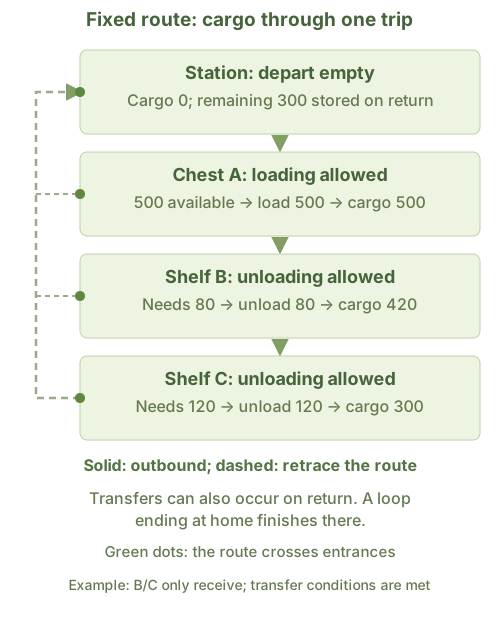
- Choose fixed-route transport and open transport routes.
- Draw from the station exit through the green entrance markers of each stop.
- Choose route goods. Enable loading at supply stops and unloading at receiving stops.
What does free transport need?
Choose free transport at the station, select items and set its service range. At least one task endpoint must be inside the range. Allow free-wagon export and import. The default minimum is 1000 items and maximum 2000; all stations share these settings. Vehicle capacity also limits each transfer.
Why isn’t it departing?
Locate the wagon and read its state: driver attendance, enough horses, fodder, aging horses, driver leave, vehicle cooldown or a blocked route. A fixed route also needs a drawn path and recognized facilities.
| Timer | When it clears |
|---|---|
| Station fixed-route dispatch | More than 5 days after the previous dispatch |
| Vehicle return cooldown | More than 10 days after transport ends |
| Coachman leave | Initially 30 days after returning; adjustable at the station. The three timers run separately, not in sequence. |
View the fixed-route loading diagram
Rule sources
FacilityWagonStation.cs; WindowWagonStation.cs; Wagon.cs; Wagon1.cs; Wagon2.cs; InteractiveModeDrawRoute.cs; C.cs