Commanding troops: selection, groups and orders
How do I select troops and give orders?
- By default, left-drag to select. Right-click the ground to move or an enemy to attack.
- Double-click the same soldier to select visible friendly soldiers of that troop type who are not unconscious. Enabling right-button box selection swaps the selection and command buttons.
How do I save a group?
Select troops and press Ctrl + 1–9 to save a group; press its number to select it. If every selected unit already belongs to that group, Ctrl + the same number clears the entire group. Key bindings are editable in settings.
Which soldiers cannot be commanded directly?
Neutral soldiers, orderlies, militia and soldiers aboard ships are excluded from ordinary player box-selection control. Control the ship for embarked troops. For other units, check consciousness, whether the target still exists, access and current warmth or supply tasks.
How do I read combat values?
Unarmed punches use 5% of the target’s maximum HP as base physical attack. The random-range explanation below covers ordinary weapon attacks.
| Value | Meaning |
|---|---|
| Attack power range | Physical and magic attacks each show lower and upper bounds. Ordinary attacks roll within the range; status effects modify attack power. It is not guaranteed HP loss. |
| Reach | Distance allowed to begin an attack; melee and ranged troops use their own troop-type reach. |
| Attack interval | Attack cooldown in seconds; lower values allow more frequent attacks. It is not measured in game days. |
View the command diagram
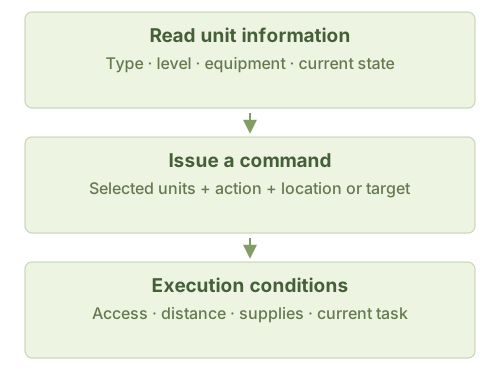
Rule sources
InteractiveModeSelectSoldier.cs; InteractiveModeControlSoldier.cs: TryDoubleClickAndSelectSameTypeSoldier / MakeSoldierGroup; InteractiveModeManageBase.cs; ShortcutHelper.cs; WindowSetting.cs; Npc.cs: IsSoldierCannotOpByPlayerNow; Soldier.cs: GetAtkWithRandom / GetRandomAtk / GetMagicAtkWithRandom; BattleUnit.cs: IsInAttackCd; C.cs