Connecting storage to workshops
How do I check the connection?
Open the workshop and look for the linked-storage notice and connection lines. A shelf’s workplace connection range is adjustable.
Which storage connects, and where should it go?
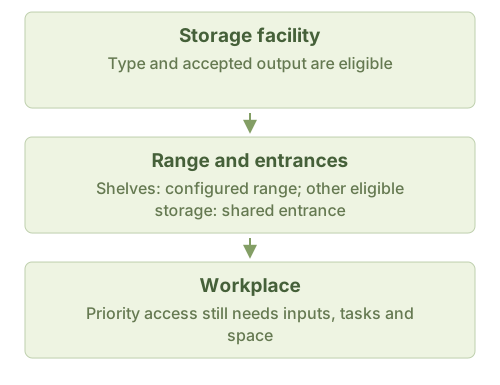
Automatic connection needs eligible storage, overlap between its connection range and the workplace footprint, and support for at least one workplace output. The entrance condition below also applies.
| Storage types | Range and entrance |
|---|---|
| Shelf | Initially 2 tiles out in each direction; adjustable separately. Entrances need not overlap. |
| Large Storage Chest, Material Pile, Transit Crate, Compost Bin, Trading Post, Border Trade Outpost, Ice Cellar (7×7) | Checks 2 tiles beyond the footprint and requires at least one shared entrance tile. The 2×2 Ice Cellar is not in the eligible storage list. |
Is the 50-tile search range a connection range?
No. Workshops search 50 tiles for inputs by default; storage uses its own connection range. Connections still need available inputs and space. Reserved stock or full storage can cause waiting.
Can connected output exceed planned stock?
Yes. Connected workshops prioritize shelf deposits even above the target. The shelf must still store the item, have space and offer a reachable entrance. A connection does not create missing inputs.
View the connection diagram
Rule sources
BoxAttachHolder.cs: IsCloseEnough / TryAttachBox / GetAttachedBoxNearestToPut; Facility.cs: CanConnectByPos / GetConnectRangeLeft; FacilityWork.cs: IsBoxCanConnect; FacilityStorageBase.cs; WindowDistributionCenter.cs; box.json; build.json; C.cs